You stop losing things
Everything is in one place and the search also reads your scans. The thing you wrote in March is there, with its version history, in two seconds.
 gethrs
Write, file, search everything, even the text in your scans. Checklists become tasks with reminders. Works offline, in any browser, with no AI in the way.
No card. Export everything, anytime.
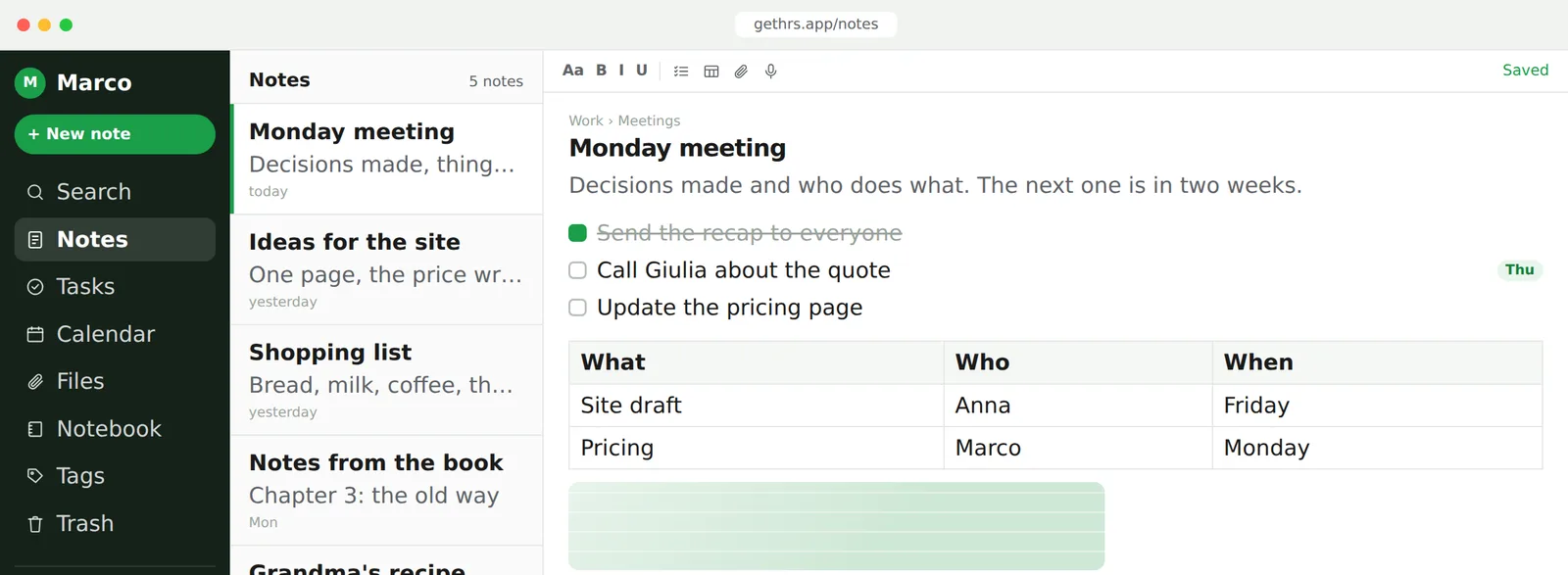
A block editor with headings, lists, tables and images. Dictate a note, record a call and get the transcript, or paste from anywhere and keep the structure.
Notes live in notebooks, notebooks in spaces, colour tags across all of them. Tick a checkbox and it is a real task with a due date and a reminder.
Search runs on titles, text, tags and inside PDFs and photos (OCR): a scanned receipt or a whiteboard photo turns up by a word you remember.
Not a longer feature list: the three things you notice after a week.
Everything is in one place and the search also reads your scans. The thing you wrote in March is there, with its version history, in two seconds.
A checklist in a meeting note becomes tasks with people, dates and reminders. You see all of them in one view and on the calendar, and tick them off from either side.
No AI rewriting or summarising unless you switch it on. One readable backup of everything, whenever you want it. Nothing to install, works offline.
Nothing writes for you in the editor. But Claude, connected through MCP, can work in your notes when you ask it to.
On claude.ai or Claude Desktop: Settings → Connectors → add a custom connector with the Gethrs address, sign in with Google, allow. In Claude Code, one command with a token.
«Make a note with the points of this call and a task for Friday», «what did I write about the logo in March?». Claude creates, appends, searches, reads, adds and ticks off tasks.
Claude acts only when you ask, in its own window. The connection is a token you see once and revoke from Settings. No AI watches your notes.
A note made by Claude is a note like any other: same notebooks, same search, same backup.
A block editor: headings, lists, quotes, tables, images you resize by hand. Checklists become real tasks. Dictation, call recording with transcript, templates, paste that keeps its structure.
Notes live in notebooks, notebooks in spaces. Colour tags across notebooks, a Tasks area with due dates and priorities, a calendar, reminders that arrive.
Search titles, text and tags, and search text inside PDFs and photos (OCR): a scanned contract or a whiteboard photo turns up by one word. Version history and a trash you can undo.
Share a note, a notebook or a space by email, read-only or editable. Real-time co-editing. A reading password on private notes. Works offline.
Bring your notes in from one export file. Export everything as one readable backup. Italian and English, light and dark. No AI unless you switch it on.
The real problems of people who take notes, one at a time. Open yours.
Yes: export them as an .enex file and import it from Settings → Import. Notes, notebooks, tags, checklists and attachments all come along, with their original dates.
As many as your export holds: the file is read in your browser, one note at a time, so an export of several gigabytes works too. Importing the same file twice duplicates the notes, so do it once.
Nothing rewrites, summarises or suggests while you type. Text reading from photos, call transcription and the Claude connector are off unless you switch them on.
Yes. It opens in your phone's browser and installs to the home screen like an app, with offline reading and push reminders. Nothing to download from a store.
Nothing during the beta. Prices come later, in plain writing, and people in the beta hear them first.
Always: «Export everything» downloads one file with notes, attachments and structure. The same file restores from scratch, here or elsewhere.
Yes. Every note belongs to your account and no page of the app is public: there is nothing to index outside. Only people you invite see a note of yours.
An account. Sign in with Google and your notes are right there, with a few templates ready.